What makes great UX?

The Webby Award 2017 winners were announced today so I found myself looking through the entries, all of which were incredibly innovative and exciting websites. The design, structure and experience of these websites were all seamless in their execution. I took particular interest in the ‘user experience’ category and started looking through the archives of previous winners. Virgin America managed to snap up the award 5 years in a row from 2008-2016! The Virgin America website does not look overly complicated and neither do any of the other nominees or winners, which is exactly what makes these websites so great. So what is it that makes fantastic user experience?

Simplicity is key. The most important aspect of user experience is putting yourself in the user’s position. Understanding your audience is the first step in most marketing strategies and designing your website is no exception. These are some of the key aspects of design when considering UX.

Sometimes digital growth is strategically simple—we call it leverage. Let’s start talking.

Understand your audience

Know where your audience is looking; what pages they’re using; how long they’re spending on each page; what browser they’re using. This information is vital in designing a website that people are going to want to engage with and be interested in. Implementing a heat map would be a good idea to gain insight to where your audience is looking and if they’re missing any key information. We use CrazyEgg for heat map tracking.

Don’t over clutter

White space is good! You might think you need to get as much information out as you can to lure your audience in however it will probably work against you. If there is too much information or the site is too word heavy, your audience will be bombarded and retain nothing. Be concise and direct. Display what’s most important and clearly provide a CTA where they can contact you to find out more information. On that note, make sure your CTA is at the top of the page on EVERY page. Make it as easy as possible for people to contact you.

Think quick

Convey your message as quickly as possible. If your audience has to wait too long for the page to load or they don’t see what they’re looking for in a matter of seconds, they will leave. Create a good first impression by showing your audience you have exactly what they are looking for. Have your most important information within first view on the landing page.

Step Back

When designing your website or coming up with ideas, take a step back and put yourself in the end user’s position. Will they know those icons are actually your navigation bar? Will they bother scrolling to the bottom of that page? Will they notice that little arrow to scroll through images? You might think the design is innovative but if the audience doesn’t understand how to use it, it will fail. Having your website look amazing is important but ensuring it is easy to use is just as, if not more important. 

If you have some ideas of how you’d like your website to look but have no idea how to implement it, get in touch with us. If you have no clue what you’d like your website to look like but you know it needs improvement, we can execute the whole process for you. Maybe you don’t yet have a website but you’re looking to develop one. We can help you there too! Give us a call or send us an enquiry today. 

Interested in more?

Avoiding New Website Blues: Why You Need Website Discovery

Have you ever been involved in a website project where the final deliverable or outcome just didn’t hit the brief of what you wanted or had envisaged? If not, that’s awesome! But if your answer is a resounding ‘yes’, you’re not alone. This, unfortunately, happens a lot with website projects. However, it can easily be avoided if a proper discovery process is followed to truly understand the expectations and objectives for the project.

Shopify Pay

For online shoppers, there’s no bigger shopping spree mood killer than an extensive checkout process. When shoppers are frustrated with a lengthy payment process they will often abandon the checkout completely; which is part of the reason why the average cart abandonment rate is so high at 69%.

Shopify Pay is a new development that will look to benefit both the business and the customer. Shopify Pay has completely simplified the checkout process by allowing customers to check out in seconds by using a 6-digit code that is sent to their phone. Instead of filling out pages of payment and shipping details, customers will be able to skip this whole process with the unique code that will activate their saved details whenever they shop with Shopify stores.

Sometimes digital growth is strategically simple—we call it leverage. Let’s start talking.

How does it work?

Signing up for Shopify Pay is really simple. When the customer fills out their payment and shipping details as normal, they will be given the option to opt-in to Shopify Pay. The next time they use any Shopify store, Shopify Pay will come up as a payment option to which they can select, fill in their unique 6-digit code- sent to them via text- and checkout. The option will be available to all customers of Shopify stores however is entirely optional for the customer. Customers will continue to have the option of filling out details as they go at each transaction.

This new option is secure and reduces what is usually a complex procedure. Shopify Pay will store the customer’s information but can only be activated with the 6-digit code which is sent to their phone and serves as a security step in authorising identity.

Any results so far?

The results of Shopify Pay are proving to be successful with the implementation having already begun across thousands of shopify stores. These stores have seen a much more accelerated checkout speed, up to 40% faster, and an increase in conversion rates by up to 18%.

With the average cart abandonment rate being as high as it is, many of these abandonments can be attributed to difficult payment processes. If steps can be reduced in this process and time can be saved, the hassle of paying online will be reduced significantly.

When can we use it?

Shopify Pay is set to be available to every store using Shopify Payments over the next few weeks, for no additional costs. It can be used on any device or browser, making it a fast and simplistic payment solution. Further information from Shopify can be found here. 

Interested in more?

What’s in store for StripECon APAC

Today we are announcing the key speakers and talks for the 2nd StripeCon APAC, the community run SilverStripe conference in the Asia-Pacific region. The presentations are set to give you some outstanding case studies, the best tips and tricks on using SilverStripe CMS/Framework and SilverStripe 4, as well as what’s in store for future SilverStripe development.

Sometimes digital growth is strategically simple—we call it leverage. Let’s start talking.

SilverStripe development

Open source community members who are directly involved in the development of SilverStripe CMS/Framework will provide an overview of the development focus in the past, present and the future, as well as some technical advice on using SilverStripe software. Long time core contributor, Damian Mooyman, will talk about SilverStripe 4 with a focus on our development direction. You will be able to see how SilverStripe CMS/Framework has evolved and where it is going in the next versions. The most commonly asked question over the past year will be answered: “When will the SilverStripe 4 stable release be out?”.

SilverStripe Developer, Robbie Averill, has been hard at work upgrading sites and modules to SilverStripe 4. He will share with you what he has discovered that could prepare you for upgrading your projects to this new CMS/Framework.

We will also dedicate some ‘ask us anything’ time at the conference to answer any burning questions you have – directly from SilverStripers in the Wellington headquarters.

Case studies and tech talks

There will be a couple of case studies on using SilverStripe software to deliver successful projects. Internetrix will share some lessons on their latest success using SilverShop for a government site.

SilverStripe is not just a CMS but also a framework with the development flexibility suitable for more demanding application level projects. SilverStripe Support Developer, Dylan Wagstaff, will prove this with insights from a project he worked on in the UK.

More technical talks are also on the agenda: Stead Lane, the host of StripeCon APAC, will focus on some of the SilverStripe modules that they have developed and gained overwhelmingly positive feedback from the open source community. Haylix engineers will discuss DevOps and why DevOps needs specialists.

See you in Canberra!

We will reveal the full schedule on the StripeCon APAC website next week. If you want to be the first to know and get your questions answered directly from the source, get your tickets now!

This conference cannot take place without the generous support from our host Arkhi and sponsors: SilverStripe Ltd, Internetrix, and Innoweb.

Interested in more?

Top 6 free tools for digital marketers

Creating a digital strategy and maintaining it is one of the most important factors in digital marketing. No matter what changes you make to your website, your SEO, paid advertising or social media, you need to be willing to adapt to how your audience is responding to these changes. The best way to follow these responses is by tracking your performance through an abundance of different tools.

Sometimes digital growth is strategically simple—we call it leverage. Let’s start talking.

Using a range of tools is great as each tool brings something different and allows a deeper level of insight into what your performance actually means. 

6. Crazy Egg

So technically, it’s only free for 30 days, but it is still worth a mention. Crazy egg gives an insightful look into where people are going on your website. It’s a scroll map tool that shows exactly where people are clicking and what information they are looking at on each page.

How it helps: Without using this, you may not realise that visitors are missing important information, images or links due to where they are situated on the page. By analysing how your audience interacts on each page, you can create a more functional design to ultimately generate more leads or sales.

5. Buffer

Sometimes it can be hard to keep track of what you’re posting to each social media channel and when. Buffer is a social media management tool that allows you to keep all your posts in one place, making it easy to schedule and plan your posts.

Other options: The free version allows you to post for one social media account per platform but you have the option to upgrade and manage as many as 150 accounts!

4. Answer the Public

For those times when you really need some content inspiration. By plugging in a keyword you might be interested in writing about, Answer the Public generates hundreds of questions and discussion points that can lead you to beginning to write an article or blog post.

Cool functions: It lists a range of questions with keywords how, which, where, why, who, what, when and are, as well as a similar style for prepositions. It then goes on with an even more extensive list of possible topics in alphabetical order. Goodbye writers block!

3. Screaming Frog

This tool is a website crawler that crawls websites URL’s and analyses onsite SEO. It does so by finding broken links, duplicate content, analyses page titles and meta data and other relevant information that may need fixing to improve SEO.

Why you should use it: With a limit of 500 page crawls for the free version, it’s likely you can crawl your entire website and find some really important information. It may be a matter of fixing a few page titles or you may find most of your pages are missing key meta data. 

2. Moz Open Site Explorer

Open site explorer is a free tool that allows you to check your domain and page authority. It also gives you a spam score and shows you how many inbound links you have and from which sources.

How it helps: It is good to monitor your domain and page authority from month to month in order to track performance and notice any big changes. You can also monitor your competition and see how you’re tracking comparatively. 

1. Google Analytics

No other website gives you this much information for free, it’s pretty remarkable. Analytics shows you everything that is going on on your website. How many visits your website gets; how long people are spending on your website; how they got there; what pages they’re looking at. The list goes on.

Why it’s great: Being able to understand your audience’s level of engagement gives great insight into how interesting your content is and what might need changing. This can be measured through pages visited and time spent on page.

If you’ve started using these tools and realise your website or digital strategy needs a bit of an overhaul, that’s where we come in. Give us a call or send us an email and we can schedule something in. We’d love to see you get the results you’re after.

Interested in more?

How To Market On Digital Platforms

With social media taking over the marketing space, gaining awareness, retaining attention, and converting people is a competitive space. So how does your business stand out and meet your goals through social media marketing?The key is having an effective digital marketing mix. Each platform is unique in its offering and its audience, requiring different marketing methods and tactics.

Why you need keyword research for any content creation

Firstly, what is keyword research?

Keyword research is the process of finding words and phrases that the audience you are targeting, will likely search for. It’s about being where your target audience is searching, and delivering the information they are looking for. Keyword research can be used for SEO, Blogging and digital advertising and will help you deliver more appropriate content.

Sometimes digital growth is strategically simple—we call it leverage. Let’s start talking.

Why do I need to do it?

By researching keywords that are trending and performing well in your industry, you have the potential to find a successful niche. Whether it be paid advertising, online marketing, blogging or Search Engine Optimisation, keyword research is the most important step in ensuring the content you create is relevant and has the opportunity to be successful.

Understanding what words and phrases are going to help your website rank is the most fool proof way to direct the right traffic to your website. I emphasise the phrase ‘right traffic’ as being an important aspect of keyword research.

The relevance of keyword research is the idea that people will find your page as a result of it being exactly what they are looking for. Identifying who you’re targeting and being the answer to their questions will help you define what keywords are worth optimising.

If the keywords you have chosen to optimise are not relevant to your target audience, the wrong traffic will end up on your website which can lead to a high bounce rate and low levels of engagement.

How do I find what keywords will be best for me?

There are a lot of tools available for you to research and plan keywords. Many of these tools also allow you to track keywords so you can see how your ranking changes as you begin to optimise and focus on improving your keyword research.

Some tools include, but are certainly not limited to

In your research you may come across the phrase ‘Long-tail keywords’. These are generally questions or sentences as opposed to one or two word search terms. As opposed to searching ‘Gold Coast Restaurants’, a long-tail keyword may be ‘Best Italian restaurants on the Gold Coast’. Long-tail keywords are more specific and have already been narrowed down to what the user is looking for. They make up approximately 70% of all searches so can be a good opportunity to optimise for some businesses.

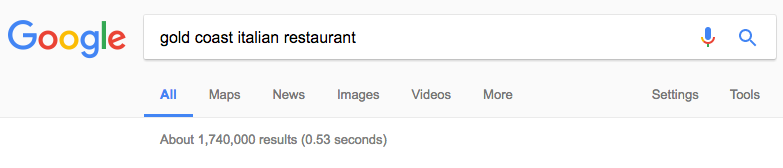
General search terms or keywords can be absolutely any word or phrase, but there is still need for specificity. If I use the above example for an italian restaurant on the gold coast, a search for ‘Italian restaurants’ will bring up millions of results. Although Google will likely show results relative to your location, there will be interstate restaurants ranking higher than many Gold Coast ones. By specifying ‘Gold Coast Italian restaurant’ your website will be more likely to rank and more specific to what the user is looking for.

Screen Shot 2017 01 19 at 1.14.36 pm

* Note the difference in result volume.

Screen Shot 2017 01 19 at 1.14.52 pm

If you need a hand with your keyword research or would like to improve your SEO and digital advertising, we’re always available to have a chat. Give us a call today, we’d love to hear from you.

Interested in more?

Why mobile should be your first priority

As of last year, more websites are loaded on a mobile device than they are on desktop computer. This data was surprising to no one and the idea that this trend will continue is even less surprising. What is surprising though is the number of websites that are STILL not mobile optimised.

When you take this data into consideration, you would assume most people would focus primarily on developing a website to suit mobile. However, an overwhelming number of businesses continue to focus on desktop as their primary point of development. 

Sometimes digital growth is strategically simple—we call it leverage. Let’s start talking.

The thing is, people want to know things immediately. It’s that instantaneous nature of the mobile device that has lead to its undeniable success. We take our mobiles absolutely everywhere; like an extension of our arm. There is never a time anymore where you are unable to know the answer to something. Google literally provides an answer to anything from a take-away shops phone number to the highest scoring player of the 2016 AFL season (Patrick Dangerfield for those curious).

Almost always, Google provides us with an answer. But Google cannot control everything and that includes making sure your website is as user friendly as possible.

Common mistakes we often see on Mobile websites include

  • Slow page speed
  • Links too close together. When the touch point is too small, it makes it impossible to click on the correct link
  • Overlapping images
  • Videos not viewable on mobile
  • Faulty redirects

Imagine you’re a physiotherapist in Brisbane and someone in Brisbane is in need of some treatment. They search ‘Brisbane Physios’ and your website pops up in the search results. Awesome for you. The not so awesome part though, is that your website looks terrible on a mobile device. The images are nice and bright, but they are overlapping. The font is huge and crowded and the ‘Call Now’ button is covered by the menu button. On a computer, your website looks pretty great but on a mobile, where most people search from, it looks terrible.

As statistics show, people are researching more on their mobiles so the mobile experience has to be just as, if not more, efficient and pleasing as any other. The user who just searched for your website has already clicked back to Google and booked an appointment with another physiotherapist (whose website was mobile optimised).

Its simple things like, ensuring call buttons actually work and images not being crowded on the mobile device, that can be the difference between an enquiry and an exit.

Avoid these issues altogether by allowing us to give your website the attention it deserves. We can give your site as much or as little love as you think it needs. 

Get in touch with us today.

Interested in more?

Avoiding New Website Blues: Why You Need Website Discovery

Have you ever been involved in a website project where the final deliverable or outcome just didn’t hit the brief of what you wanted or had envisaged? If not, that’s awesome! But if your answer is a resounding ‘yes’, you’re not alone. This, unfortunately, happens a lot with website projects. However, it can easily be avoided if a proper discovery process is followed to truly understand the expectations and objectives for the project.

What makes great UX?

The most important aspect of user experience is putting yourself in the user’s position. Understanding your audience is the first step in most marketing strategies and designing your website is no exception